Pixora - Digital Agency Website Template

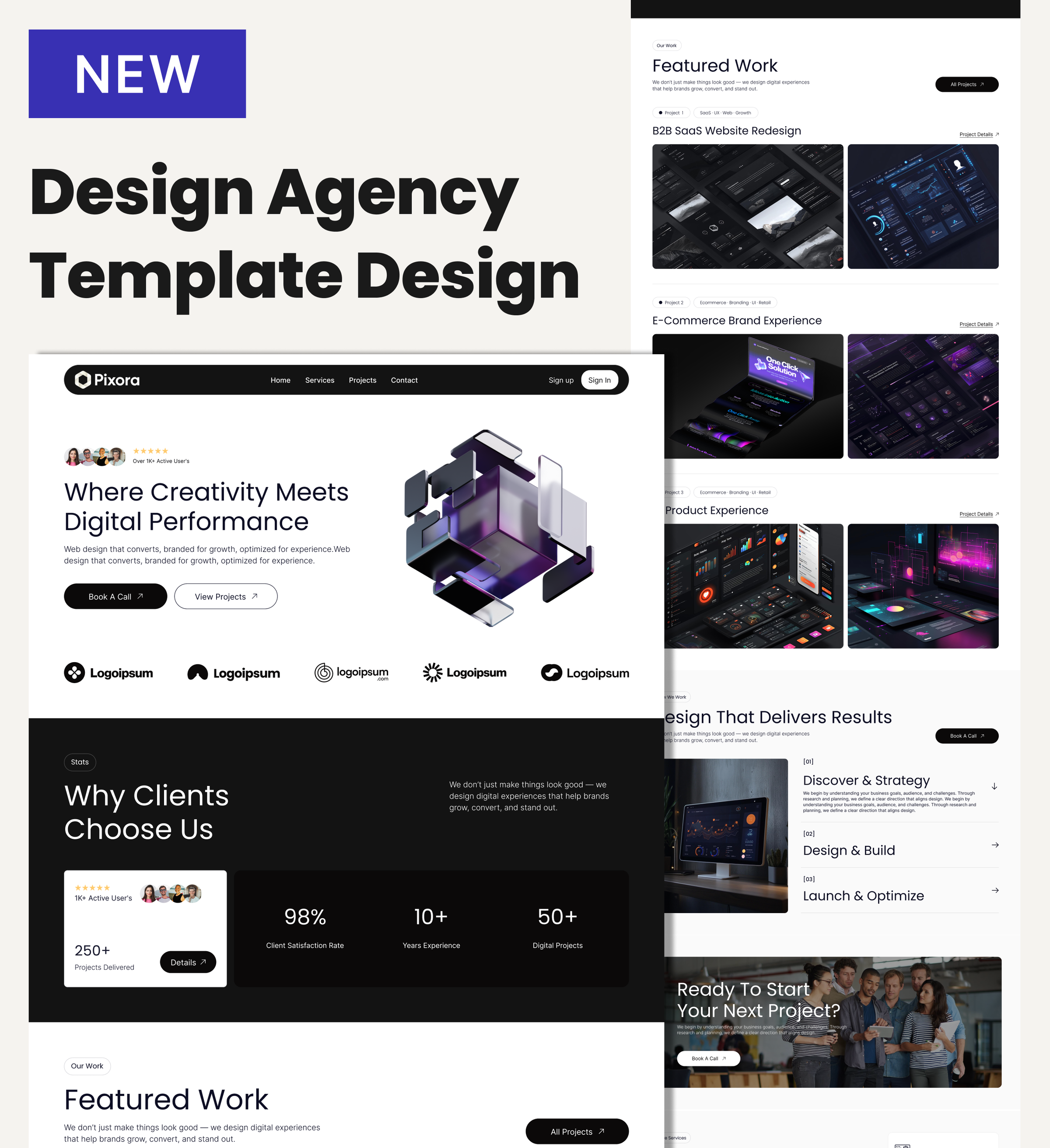
A bold, dark-mode template for digital and creative agencies — showcase your services, projects, team, and blog in one polished, CMS-powered site.

Digital agencies don't just need a website. They need proof. Pixora is built for studios and creative teams whose work speaks louder than words — and whose site needs to match that energy.

With dedicated pages for services, projects, blog, and contact, every section is designed to convert curious visitors into booked clients. The dark, high-contrast aesthetic signals credibility before a single word is read.

Built on Dorik's CMS, updating your portfolio, publishing insights, and managing service content requires no technical help. Launch fast, stay current, and let the work do the talking.

Key Features

Turn Your Portfolio Into a Client Magnet

Pixora includes dedicated Project and Project Detail pages powered by Dorik's CMS. Each case study can carry its own hero image, challenge overview, and outcome summary — giving potential clients the proof they need to reach out.

Agencies that show detailed work consistently win better projects. With structured portfolio pages already in place, you skip the setup and go straight to showcasing what matters.

Services Pages That Sell Without a Sales Call

A Services listing page and individual Service Detail pages let you go deep on each offering — what you do, how you work, and why it matters. Accordion sections make complex information digestible without clutter.

Clients often decide before they contact you. Clear, detailed service pages help them self-qualify, so the conversations you do have are already warmer.

Build Authority Through a Built-In Blog

Pixora comes with a Blog listing page, individual Blog Post pages, and a Blog Preview section on the home page — all managed through Dorik's CMS. Publish insights, case studies, or industry commentary without touching any code.

Consistent publishing signals expertise. It also compounds over time: every post is an SEO asset working for your agency long after you hit publish.

Stats That Stop the Scroll

Counter Animation sections let you display metrics like projects delivered, client satisfaction rates, or years in business in a visually striking way. Numbers build instant trust, especially paired with a bold dark design that makes them impossible to miss.

Contact Built for Conversion

The dedicated Contact page combines an address block, email, phone details, and a contact form with name, email, phone number, and message fields. A clear CTA with "Book A Call" language throughout the template keeps the path to inquiry frictionless.

Reusable Components

Pixora uses Dorik's reusable components system, so sections like the CTA block — "Get in Touch with Our Team" — and the footer are built once and shared across every page. Update the phone number or CTA copy in one place and it reflects everywhere instantly.

This is especially useful for agencies managing multiple service or project pages, where consistency matters and repetitive edits waste time better spent on client work.

Customizations

Pixora's entire visual system — dark backgrounds, white typography, card layouts, spacing, and button styles — is customizable through Dorik's drag-and-drop editor. Swap in your logo, update your brand colors, replace placeholder project images, and edit copy directly on the page.

No developer needed. Responsive design is handled automatically, so your site looks sharp on mobile, tablet, and desktop. For agencies with specific needs, Dorik also supports custom CSS to push any element further.

Special Features

Pixora includes a Video Background element and a Video Element section — less common in standard agency templates — giving you the ability to put motion front and center without embedding from external tools or losing page performance.

Beyond that, every page benefits from Dorik's AI content and image generation tools, unlimited storage and bandwidth, and a global CDN that keeps the site fast for visitors anywhere in the world. No caps, no overages, no performance anxiety as your portfolio grows.

Use Cases

Boutique UX and Design Studios

Small studios with a strong point of view need a site that signals quality immediately. Pixora's dark, editorial aesthetic does that before a visitor reads a single word. Add your actual case studies through the CMS, list your services in detail, and your site does the positioning work for you.

Freelance Designers Moving Upmarket

A freelancer ready to charge agency-level rates needs a site that justifies them. Pixora's project detail pages, service breakdown structure, and testimonial slider give solo operators the professional presence to compete with studios twice their size.

Development Agencies Highlighting Technical Work

Dev-focused agencies need to show, not just tell. The portfolio and project detail pages support rich content — project overviews, challenge descriptions, outcome summaries — structured to walk prospects through the thinking behind the work, not just the finished product.

Marketing and Branding Consultancies

Consultancies selling strategy alongside execution benefit from Pixora's blog infrastructure. Publishing thought leadership and case studies through the built-in CMS positions your team as the obvious choice before a prospect even submits an inquiry.

Agencies Expanding Their Service Offering

Growing teams adding new practice areas — say, moving from web design into brand identity or conversion optimization — can use Pixora's Service Details pages to introduce each new offering clearly. Add a page, fill in the content, and it's live without rebuilding the site.

Why Choose Pixora - Digital Agency Website Template?

  • CMS-powered portfolio and project detail pages included — no page builder workarounds needed to showcase case studies
  • Service Detail pages built in, so you can go deep on each offering rather than listing services in a single paragraph
  • Video Background element included by default, unlike basic agency templates that require third-party embeds
  • Counter Animation section for displaying metrics like project count or client satisfaction rates — social proof built into the layout
  • Blog with full post pages and home page preview — publish insights and build SEO authority without installing plugins
  • Zero transaction fees and unlimited storage on all Dorik plans, so your site scales without unexpected costs
  • Dark-mode aesthetic designed specifically for digital agencies — not a generic light template with a color swap

FAQs

Does Pixora work without coding knowledge?

Yes. Pixora is built on Dorik's no-code drag-and-drop editor. You can edit all text, images, colors, and layouts without writing a single line of code. Custom CSS is available if you want to go further.

Can I add my own projects and case studies?

Yes. Project and Project Detail pages are included and powered by Dorik's CMS. Add as many case studies as you need — each with its own title, images, overview, and outcome sections.

How many service pages can I create?

Unlimited. The template includes a Services listing page and a Service Details page structure. Duplicate the detail page for each service you offer and fill in your content through the CMS.

Does the blog support scheduling posts in advance?

Yes. Dorik's built-in blogging platform includes content scheduling, so you can write posts ahead of time and set them to publish automatically on a future date.

Can I connect a custom domain to Pixora?

Yes. Dorik supports custom domain connection from any provider. SSL is included automatically via Let's Encrypt, so your site is secured from day one.

Is the site optimized for search engines?

Yes. Pixora is built with SEO optimization in mind, and Dorik provides meta title and description controls, canonical URLs, sitemap.xml generation, and schema markup — all accessible without plugins.

Will the template look good on mobile devices?

Yes. Pixora is mobile-first and fully responsive. Every page — home, services, portfolio, blog, and contact — adapts automatically to any screen size.

Can I collect leads through the contact form?

Yes. The Contact page includes a built-in contact form with fields for name, email, phone number, and message. No third-party form tool required.

Does Pixora support a team members section?

Yes. The About page includes a Meet the Team section where you can add photos, names, roles, and social icon links for each team member.

Can I use Pixora for a white-label client site?

Yes. On Dorik's Business plan and above, white-label dashboard options are available. You can present the site builder under your own brand when handing off to clients.

Categories
Styels
  • Dark Mode
  • Modern
  • Professional
Layout
  • Multi-page
  • Card Layout
  • Grid Layout
  • Hero Centered
Features
  • Responsive Design
  • Mobile First
  • Content Management System (CMS)
  • Fully Customizable
  • SEO Optimized
  • Performance Optimized
  • Reusable Components
  • CSS Grid
  • Hover Effects
  • Image Background
  • Animations
  • Contact Form
  • Social Icons
  • Counter Animation
  • Accordion
  • Pricing Tables
  • Testimonial Slider
  • Image Slider
  • Video Element
  • Read More/Less
  • Subscription Form
  • Star Rating
Sections
  • Hero
  • Logo Banner
  • Call-to-Action Buttons
  • About
  • Story
  • What We Do
  • Features
  • Services
  • Work Examples
  • Portfolio
  • Testimonials
  • Team Members
  • Statistics
  • Counters
  • FAQ
  • Pricing Tables
  • Blog Preview
  • Contact Information
  • Newsletter Signup
  • Footer
Pages
  • Home
  • About
  • Service Details
  • Services
  • Portfolio
  • Project Details
  • Blog
  • Blog Post/Article
  • Contact

Your next website costs nothing.
Start now.

Build unlimited websites with custom domains, a full CMS, and built-in SEO. No credit card. No catch. No kidding.

© 2026 Dorik, Inc. All rights reserved

Built with Dorik
Built with Dorik