
Small businesses achieve measurable social media results with monthly budgets of $500-$1,500 by prioritizing strategic spending over expensive campaigns.
Focus your resources on 1-3 platforms where your target audience is most active. Businesses managing fewer platforms see 3x better engagement rates and save 40-60% on content creation costs compared to those spreading across 5+ platforms.
Allocate your budget strategically: 40-50% to paid advertising, 20-25% to content creation, and 10-15% to management tools like Buffer or Canva Pro.
Leverage free analytics tools, including Meta Business Suite, Instagram Analytics, and Google Analytics 4, to track performance.
Post 3-4 high-quality pieces weekly rather than daily low-value content, and expect noticeable improvements in engagement and reach within 3-6 months of consistent implementation.
As you read on, you’ll learn how to show up online with confidence, spend smarter (not more), set a realistic budget, and track results for maximum ROI, what truly matters, so your social media actually works for you.
Topmost Social Media Marketing Tips for Small Businesses on a Budget
Small businesses can start social media marketing with a monthly budget of $500-$1500 and achieve meaningful results. Focus on engaging your audience, analyzing competitors, using budget-friendly tools, and running targeted ads. Prioritize creativity, authenticity, and strategy to grow without overspending.

Analyze the Competition
Research your competitors' social media marketing strategies before planning your own approach. Analyzing your competitors' movements in your niche on social media can help you refine your approach and avoid common mistakes.
-
Analyze competitors' brand voice, posting frequency, and audience engagement methods.
-
Track competitors' engagement patterns using free tools like Meta Business Suite Insights, or budget-friendly options like Buffer (free for 3 accounts) and Hootsuite (starting at $99/month for professional plans).
-
Don't imitate your competitors; rather, find gaps and opportunities.
Set a Precise and SMART Goal
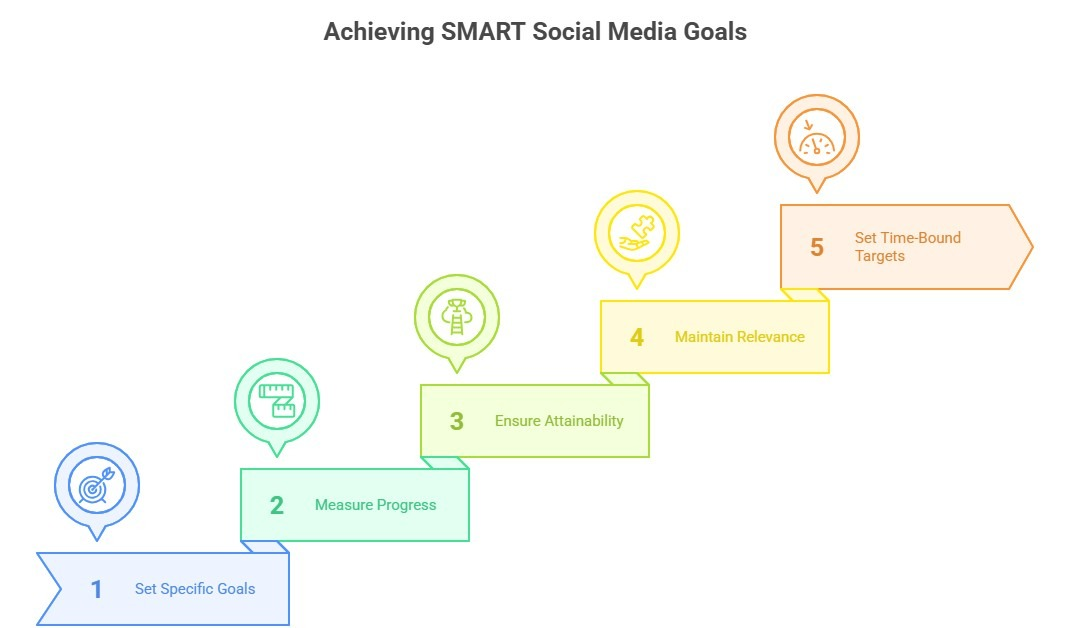
Set measurable and precise goals before launching social media marketing campaigns. By setting a SMART goal, you can make a proper roadmap for your business. SMART is specific, measurable, attainable, relevant, and time-bound. Here are 4 examples of SMART social media objectives to get you started:
-
Increase Instagram engagement by 25% in 3 months using only organic content
-
Generate 50 leads monthly through Facebook posts with $200 per month
-
Post 3-5 times per week to grow followers/community size
-
Put aside 5–10% of your social media budget to boost customer service
Recognize your target audience
Identify your target audience to ensure your content reaches the right people and generates meaningful engagement. It ensures you spend your time, budget, and energy reaching the right people.
Here's how to know and recognize your target audience:
-
Analyze demographics for basic details such as age, gender, location, and language.
-
Understand interests and behavior through likes, reactions, follows, shares, and comments.
-
Consider the necessity of your products. It should be centered on the solutions your target audience needs.
-
Use analytics tools like Facebook Insights, Instagram Analytics, and Google Analytics to know valuable data about who interacts with your business.
-
Create buyer personas to craft content that feels personal and relevant.
Choose the right platforms
Small business owners managing 5+ social media platforms see 60% lower engagement rates than those focusing on 1-3 platforms. Managing 5+ social media platforms may seem like a good idea, but it leads to inconsistency and poor results. So, concentrate on the platforms where your target audience is most active. It saves time, money, labour, and resources. Diverse age groups, industries, and customer types favor different platforms:
-
Gen Z & Millennials spend 89 minutes daily on TikTok and 45 minutes on Instagram, where small business ads cost $5-$12 per 1,000 impressions
-
Professionals & B2B customers are mostly active on LinkedIn (minimum
-
Adults ages 50+ remain highly present and engaged on Facebook(CPC averages $0.40–$1.00, with CPM around $12–$15), where a $200–$500/month budget is enough to test campaigns and generate leads or sales. Strong ROI through precise targeting and retargeting, especially for local and e-commerce.
-
Visual shoppers & DIYers are seen on Pinterest (CPC at $0.10–$0.50) and Instagram (CPC at $0.70–$1.50). A $150–$400/month budget can drive strong traffic, especially with promoted pins targeting buyer-intent searches on Pinterest, and a $300–$600/month budget works well for testing Reels, Stories, and carousel ads.
-
Video learners & long-form content seekers are basically active on YouTube (average CPV (cost per view) is $0.05–$0.30, with CPMs ranging $9–$12). Excellent ROI for brand awareness and education, with conversions tied to video quality.
Lift your social media presence
Creating accounts and setting up a persistent and genuine brand identity is necessary to make a robust presence on social media platforms. It helps small businesses connect with and build trust with their potential customers, which drives engagement and sales. To attract followers and grow a loyal online community:
-
Maintain consistent brand voice, unified color schemes, and distinctive visual style across all platforms.
-
Use a content calendar to stay active, post consistently, and avoid long gaps that make your profile look inactive.
-
Reply to comments, answer messages, and show appreciation for customer feedback to engage with your audience.
-
Mix posts, stories, videos, and live streams to keep your content fresh and engaging.
-
Share behind-the-scenes moments, customer stories, and real experiences to build trust and authenticity.
Content Creation
Post engaging content on social media platforms to attract and convert potential customers.
Types of Social Media Content and Cost Estimates
-
Educational content includes Tutorials, quick tips, and industry insights.
-
Entertaining & emotional content contains memes, storytelling, and behind-the-scenes posts.
-
Reviews, testimonials, and customer photos are examples of User-generated content (UGC).
-
Promotional content covers product features, launches, or event highlights.
-
Thought leadership content includes opinion posts, trend analysis, and original perspectives.
Budget Planning Frameworks
-
Dedicate 5–10% of annual revenue to marketing, with 20–40% allocated to content creation.
-
On a $500/month budget → $200 for content, $150 for ads, $100 for tools, $50 for community engagement.
-
Repurpose one video into multiple posts and batch-shoot photos, and rely on UGC to stretch resources.
Content Management
To be consistent, organized, and creative with your social media strategy, post content following a content calendar and proper schedule that aligns with your goals. Here's how to do it:
-
Map out your calendar to ensure a healthy mix of content (e.g., Monday Tips, Wednesday Product Highlights, Friday Customer Story). Use scheduling tools to save time, like Meta Business Suite (free), Buffer (free for 3 accounts, $6/-$15month for advanced features), or Later (free basic plan, paid plans $12–$40/month)
-
Collect content ideas to keep a running list of potential post ideas, such as product highlights or demos, behind-the-scenes updates, customer testimonials or reviews, industry tips and how-to guides, seasonal offers, or trending topics.
-
Utilize the free tiers of Notion, Evernote / MindMeister Basic, which are sufficient for capturing ideas, simple categorization, and brainstorming.
-
Use Hootsuite ($30-$600+/month) for advanced scheduling and team inbox features. Choose Sprout Social ($150-$300+/user/month) for deep analytics and CRM integration.
-
Planning is essential, but flexibility is also important, so try to have some spur-of-the-moment articles about hot subjects or neighborhood happenings. Google Alerts (completely free) and Agorapulse ($99/month) can be helpful in this case.
-
For drag-and-drop design, templates, brand kit, Canva Pro ($10–$15/month) can be a good choice.
Focus on Quality over quantity
Post 3-4 high-quality and well-optimized pieces per week rather than daily low-value content to maximize engagement and build audience trust. It's all about posting consistently and with purpose. Low-value content reduces the chance of engagement with your target audience.
Here's how to prioritize quality over quantity:
-
Post with purpose and to educate, entertain, inspire, or drive sales, not for the sake of filling your feed.
-
Invest your time in visuals like high-quality photos, graphics, or short videos.
-
Share tips, tutorials, customer stories, or industry insights to deliver value and connect with your audience.
-
Post content with authentic, valuable information to build audience trust and maintain credibility. Since posting 3-4 times weekly with authentic and cherished information fosters confidence.
-
Use analytics to track engagement and see what type of content performs best. Then, emphasize generating more of what your audience loves.
Budget-Friendly Paid Advertising Tips
Run effective social media ads starting at $15-50 daily to overcome declining organic reach (1.5-2.5% on Facebook, 3.5-7.6% on Instagram, 3.9% on LinkedIn, and about 3% on TikTok). This means small businesses must rely on paid advertising to expand visibility. Fortunately, effective campaigns don't require massive budgets, just smart strategies and disciplined tracking.
Running Cost-Effective Campaigns
-
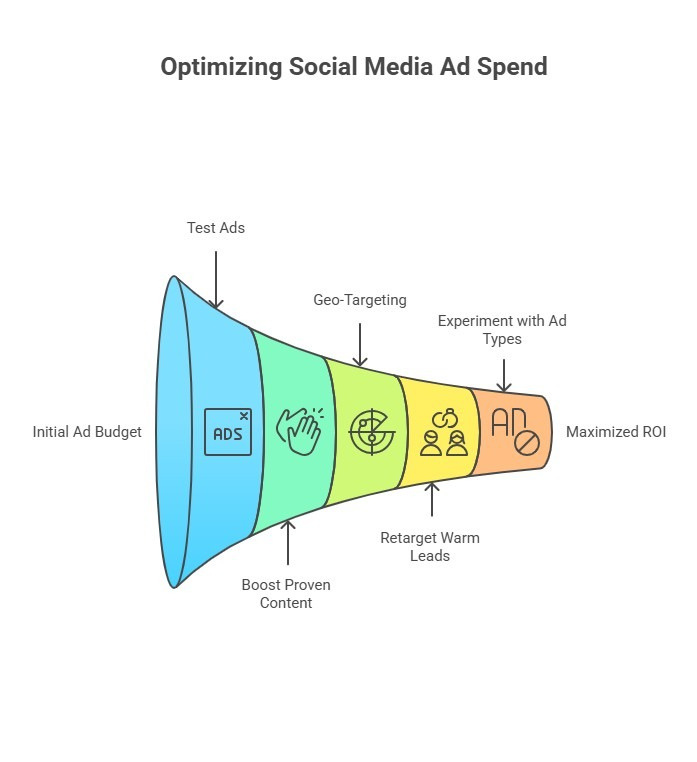
Start small, scale later. Begin testing ads with $15–$50 daily (as little as $10/day on some platforms). Many small businesses succeed with $1,000–$5,000 per month overall.
-
Boost proven content instead of creating new ads. Focus on posts with strong engagement to ensure spending targets on validated messages.
-
Geo-target wisely. Narrow your reach to specific neighborhoods, cities, or service radii to avoid wasting money on irrelevant audiences.
-
Retarget warm leads such as website visitors, past engagers, or video viewers—retargeting costs 50–70% less and converts 2–3x better than cold ads.
-
Experiment with ad types like carousels, stories, and videos to see which format generates the best ROI for your audience.
ROI Tracking & Optimization Strategies
Track performance consistently and refine campaigns based on results:
-
Key Metrics:
-
Free Tracking Setup:
-
Optimization Tips:
Setting Your Social Media Budget
Instead of overspending, focus on a well-structured, strategic, ROI-driven social media budget that fits your business objectives and audience.
1. Revenue-Based Budgeting Formula
A simple rule for small businesses is to allocate 5–10% of total annual revenue to marketing and dedicate 30–40% to social media marketing.
Formula:
Social Media Budget = (Annual Revenue × 5–10%) × 30–40%
Example:
If your business earns $100,000 annually, your ideal social media budget will range between $1,500–$4,000 annually — enough to fund ad testing, content creation, and analytics tools.
2. Budget Breakdown by Category
Here's how you can structure a balanced monthly social media budget with this cost breakdown:
-
Paid Advertising (40–50%): Campaigns, boosted posts, and retargeting ads.
-
Content Creation (20–25%): Graphic design, video editing, and copywriting.
-
Management Tools (10–15%): Tools like Buffer, Hootsuite, or Sprout Social.
-
Influencer & Partnership Marketing (5–10%): Collaborations or giveaways.
-
Testing & Optimization (10%): A/B testing and analytics tracking.
3. Platform-Specific Cost Structures
-
Facebook & Instagram (CPC $0.80–$1.50), starting from $15–$50/day.
-
LinkedIn (CPC $3–$7) is best for B2B targeting.
-
Twitter (X) (CPC $0.50–$2.00) is ideal for trend-based visibility.
-
YouTube (CPV $0.05–$0.30) is strong for awareness and product demos.
-
Pinterest (CPC $0.10–$1.50) is great for lifestyle and product visuals.
4. ROI Calculation & Conversion Tracking
To track ROI and justify spend, use:
ROI (%) = [(Revenue from Campaign – Ad Spend) ÷ Ad Spend] × 100
Conversion Rate (CR) = (Conversions ÷ Total Clicks) × 100
Free tools for tracking:
-
Instagram and Facebook Meta Pixels
-
Google Analytics 4 (GA4) provides insights into traffic and behavior
-
Links for UTM monitoring to track campaign-specific performance
5. Example of Budget Allocation Table
Category % of Total $1,000 Monthly Example Purpose
Paid Advertising 45% $450 Campaigns & boosted posts
Content Creation 25% $250 Copywriting, graphics, video
Tools & Management 10% $100 Hootsuite, Buffer, Canva Pro
Influencer Marketing 10% $100 Micro-collaborations
Testing & Optimization 10% $100 Analytics, A/B testing
Reassess your performance monthly and shift funds toward high-performing ads, platforms, or content types for feasible growth and higher ROI.
Understanding the Complications of Small Business Promotion
Small businesses face three main resource constraints: limited budgets ($500-1,500 monthly), small teams (1-3 people), and time scarcity (10-15 hours weekly for marketing). Other challenges include increasing visibility, generating quality leads, and competing with larger companies.
Established companies typically invest a minimum of $5,000 to upwards of $20,000+ monthly in social media management, while small businesses often work with budgets of $500 to $2,500 per month. For this reason, small businesses must be careful and strategic when spending money, as their budgets are limited. Here, wise and data-driven decisions, combined with a meticulously calculated budget, result in a cost-effective solution.
As the digital marketing scenario changes, small businesses struggle to keep up with the latest trends. They can stay competitive by focusing on proven strategies: 82% of users prefer learning about products through short videos, and 50% make monthly purchases influenced by creator content.
As competition is severe, competing with larger brands is very difficult. They usually dominate the marketplace with polished campaigns, making it harder for small businesses to stand out. However, creativity and authenticity are powerful differentiators in this case.
The challenge of keeping up with trends and algorithms is also critical. Social media is evolving daily, and small businesses can get lost in the noise if they do not follow an accurate strategy.
It's easy to overcome these obstacles by being consistent, making smart plans, and using budget-friendly tools and strategies.
Common Mistakes to Avoid
Small business owners commonly make 6 social media marketing mistakes that reduce effectiveness and waste budget.
-
Posting without a strategy does not bring desired results. So, focus on 1-3 platforms where your audience is most active. Businesses managing fewer platforms see 3x better engagement rates and save 40-60% on content creation costs compared to those spreading across 5+ platforms.
-
To adjust strategy, track your performance, and review insights regularly. Otherwise, you will not be able to know your progress.
-
Overlooking audience engagement reduces brand trust by 25% and decreases customer retention rates significantly. Social media is not only about posting things but also about building relationships. So, try to be as responsive as possible by replying to comments and messages.
-
Each platform has its own style and technique. So, customize your content according to the manner of the distinctive platforms.
-
Focusing only on sales can be unfavorable. Constant product promotion can drive customers away. To avoid this problem or balance promotion, incorporate inspirational, educational, and entertaining content.
-
Keep your branding unified and professional to grow sustainably without wasting resources. Avoid using different tones, logos, or visuals across platforms that confuse customers.
FAQ
Do I need to invest in expensive tools for social media success?
No, you don't need expensive tools for social media success. Free tools like Canva for design, Buffer's basic plan for scheduling (3 accounts), and Google Analytics for tracking sufficient capabilities for small businesses beginning their social media journey.
Is influencer marketing affordable and effective for small businesses?
Yes, influencer marketing is simultaneously affordable and effective for small businesses. Big influencers can be expensive, but partnering with micro influencers and local creators is economical. Micro-influencers help small businesses reach targeted demographics and niche markets cost-effectively, and sometimes, they produce better and more fruitful results.
When should small businesses consider paid advertising?
Invest in paid advertising after you've established a strong branding, a high-converting website, and an engaging content foundation. It can boost quick visibility, promote compelling offers, and retarget ideal customers.
How long does it take to see results from social media marketing?
Social media growth is slow but sure. If you have an appropriate social media strategy, consistency, authenticity, and engaging content, you can start seeing noticeable improvements in engagement and reach within 3–6 months.
Do hashtags really help small businesses grow on social media?
Yes, it helps to increase visibility and engagement. Relevant and niche hashtags connect your posts to specific topics or themes. It is helpful for the target audience to discover and engage with your content.


